
What can we help you with?
FastTest System Requirements
The table below outlines the requirements for using the FastTest system. In some cases, older versions of the applications will work; however, these are not officially supported by FastTest.
Logins will be disabled automatically if your computer fails to meet the requirements. A message will be displayed instructing you how to fix the problem.
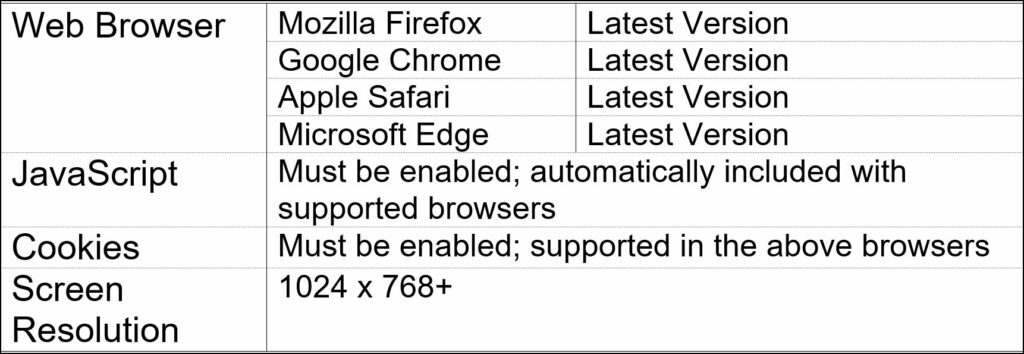
| # | Product | Description |
| 1 | Laptops and Desktop etc. | General Requirements Requirements Supported Web Browser Mozilla Firefox Google Chrome Apple Safari Microsoft Edge JavaScript Must be enabled; automatically included with supported browsers Cookies Must be enabled; supported in the above browsers Screen Resolution 1024 × 768+ Weblock Browser Supported (Need to download and install in the system) |
| 2 | iPad | Requirements Supported iPad OS Version 17.6 Model Name iPad(9th Generation) Model Number MK2K3HN/A Serial Number NVV19Q14W0 Weblock Fasttest Weblock is supported. |
| 3 | Google Chromebooks | Requirements Supported Supported browsers (latest versions): Google Chrome Mozilla Firefox Apple Safari Microsoft Edge Operating System: ChromeOS Processor Intel Celeron N4500 (up to ~2.8 GHz) Memory 8 GB LPDDR4X (onboard) Display 14″ or 15.6″ FHD (1920×1080) Secure / Lockdown Testing (WebLock) FastTest weblock is NOT supported in Chromebooks |
| 3 | Galaxy Tab S10 SM-X710NZAAMEA Wi-Fi Graphite and above | General Requirements Component Minimum Recommendation Android Version Android 13 or newer (Android 14 preferred) Minimum Tablet System Requirements for Microsoft Intune Enrollment: Android: Devices must run Android 10.0 and later for user-based management methods, and Android 8.0 and later for userless management methods. Hardware Requirements Processor (CPU) 3.36GHz, 2.8GHz, 2GHz Octa-Core GPU GPU for balanced graphics performance RAM 8 GB (minimum) Storage 128GB Display Display: 11.0″ (278.1mm), Full HD Resolution 2560 x 1600 (WQXGA) Software & Security Requirements Google Mobile Services (GMS) Required (Play Store access) Arabic Language Support Preinstalled or downloadable via Settings Device Encryption Full device encryption supported Parental Controls / Digital Wellbeing Supported FRP (Factory Reset Protection) Enabled Management and Compatibility Microsoft Intune Support Android Enterprise Kiosk Mode / App Pinning Supported (for exam environments) Accessories and Durability Input device Touchscreen (built-in), Stylus, Keyboard Repairability Reasonably repairable Power Samsung Wall Charger Power Adapter with Fast charging supported corde ( 25W Samsung TA800 EU or >30W if possible) Plug with 3 pin |
Important points:
- FastTest Weblock is not supported in Android and Chromebooks
- Weblock is supported in iPad
- Fasttest is nonresponsive hence the UI might get distorted in some touch devices
- Few Fasttest features might not work as expected on touch devices example: Highlighter plugin of Fasttest.